


Annual Pro comes with 2× normal AI credits

Explore now

Subscribe now to get 6,000 credits/month (up from 3,000) for the next 2 months

Explore now
Visily
Visily
  • Use Cases
    • Wireframing
    • Prototyping
    • Brainstorming
    • Collaboration
  • AI Design
  • Templates
    • Design Templates
    • Premade Themes
    • Smart Components
    • UI Presets
    • Images & Icons
  • Resources
    • Help Center
    • Explore Visily
    • FAQs
    • Blog
    • Release Notes
  • Pricing
  • Login
Log in
Sign up for free
  • Use Cases
    • Wireframing
    • Prototyping
    • Brainstorming
    • Collaboration
  • AI Design
  • Templates
    • Design Templates
    • Premade Themes
    • Smart Components
    • UI Presets
    • Images & Icons
  • Resources
    • Help Center
    • Explore Visily
    • FAQs
    • Blog
    • Release Notes
  • Pricing
  • Login
  • Use Cases
    • Wireframing
    • Prototyping
    • Brainstorming
    • Collaboration
  • AI Design
  • Templates
    • Design Templates
    • Premade Themes
    • Smart Components
    • UI Presets
    • Images & Icons
  • Resources
    • Help Center
    • Explore Visily
    • FAQs
    • Blog
    • Release Notes
  • Pricing
  • Login
Visily
Visily
Sign up for free
Visily
Visily
  • Use Cases
    • Wireframing
    • Prototyping
    • Brainstorming
    • Collaboration
  • AI Design
  • Templates
    • Design Templates
    • Premade Themes
    • Smart Components
    • UI Presets
    • Images & Icons
  • Resources
    • Help Center
    • Explore Visily
    • FAQs
    • Blog
    • Release Notes
  • Pricing
  • Login
Log in
Sign up for free

[Help Center] Cancel Subscription

How to cancel your subscription?

light-bulb
Note: Only Workspace owner and admin can cancel the subscription.

If you need to cancel your subscription, you can follow the steps below:

  1. Open the Workspace you want to cancel the subscription.
  2. Select the Plan tag on the top of the side panel to open the “Billing & Plans” page.
  3. Click the “Cancel subscription” button, review the impact after cancellation and select the cancellation.

Once completed the process, your subscription will remain active until the end of your current billing cycle.

How to cancel your subscription
How to cancel your subscription 1

Impacts when downgrade to Free plan

Cancelling your subscription will downgrade your workspace to the free Starter plan at the end of the billing cycle. Here are a few things to keep in mind before you downgrade:
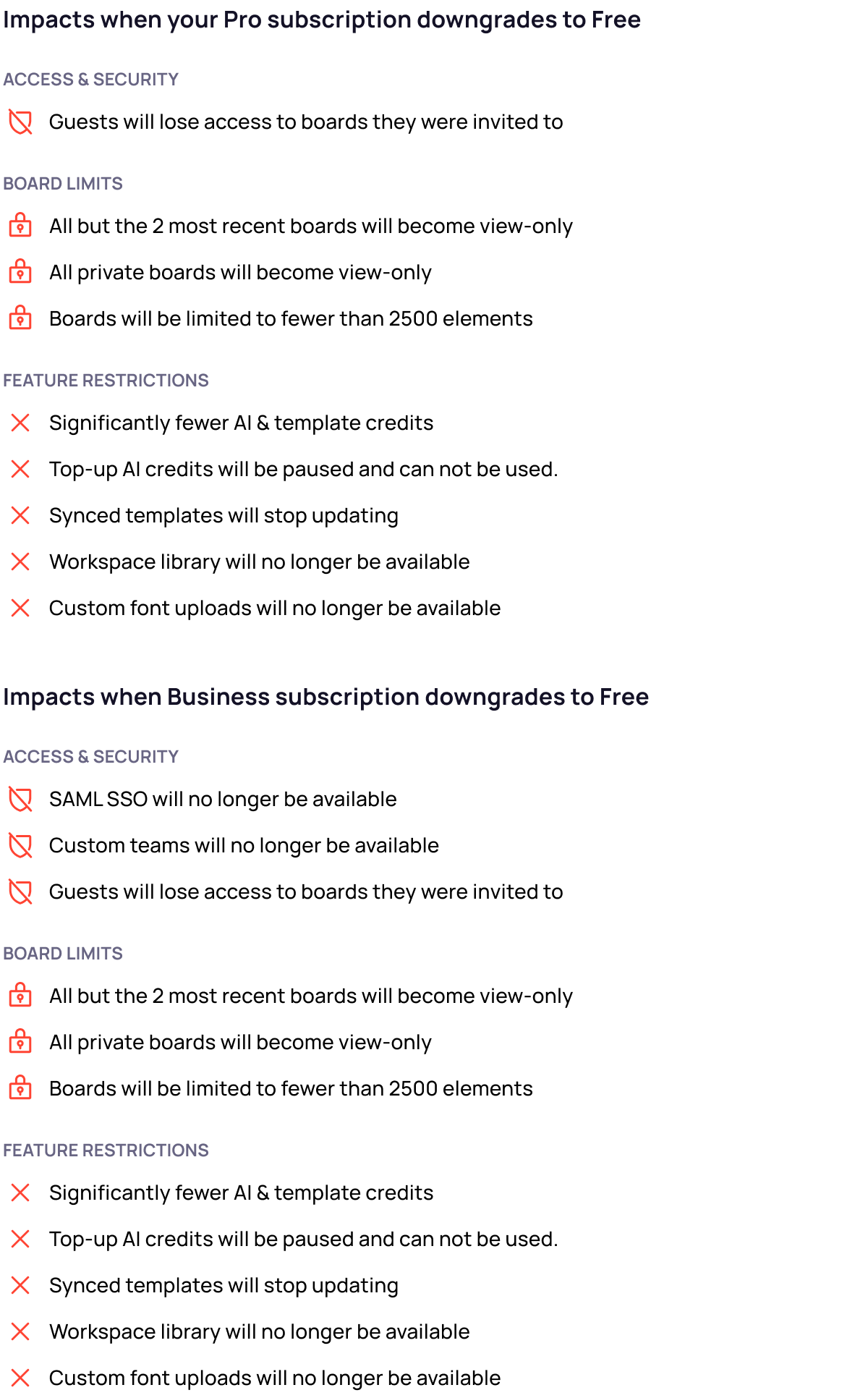
image (17)

Refund policy

Payments for Visily subscriptions are non-refundable. For detailed information, refer to Visily’s Term of Services.

With that said, if for any reason you’re unhappy with Visily, please don’t hesitate to contact us. You can reach out by emailing us at support@visily.ai. Share detailed feedback about your experience, and we’ll do our best to assist you and ensure you get the most out of Visily.

Use Cases
  • Wireframing
  • Brainstorming
  • Prototyping
  • Collaboration
Features
  • AI UI Design Generator
  • Screenshot Editor
  • Online Sticky Notes
  • UI Mockup Tool
  • AI Prototype Generator
  • Diagram AI
Resources
  • Vibe Designing
  • Blog
  • Release Notes
  • Help Center
  • FAQs
Features
  • Screenshot Editor
  • Online Sticky Notes
  • UI Mockup Tool
Use Cases​
  • AI Prototype Generator
  • Diagram AI

© 2025 Visily. All rights reserved.

Privacy Policy

Terms of Service

Terms Of Use