Design projects no longer require weeks of manual sketching and endless revisions. An AI wireframe generator is a design automation tool that uses artificial intelligence to transform text descriptions, sketches, or screenshots into professional wireframes and UI layouts. These tools have changed how teams approach product design, making it possible for anyone to create polished interfaces without formal training.
Traditional wireframing creates bottlenecks in product development. Teams wait days for designers to produce initial concepts. Non-designers struggle to communicate their vision. Iteration cycles drag on as each change requires manual updates. These delays cost businesses time and money while slowing down product launches.
AI wireframe generators solve these problems by automating the most time-consuming parts of the design process. In this guide, we’ll cover how AI wireframe generators help design projects move faster, what features matter most, and how tools like Visily make professional UI/UX accessible to everyone.
What Is an AI Wireframe Generator?
An AI wireframe generator is a design tool that uses artificial intelligence to automatically create wireframes, mockups, and UI layouts from text prompts, sketches, or existing designs—eliminating the need for manual drag-and-drop design work.
Unlike traditional wireframing software that requires users to place each element by hand, AI-powered tools generate complete layouts based on simple inputs.
The technology behind these tools combines machine learning, natural language processing, and computer vision. AI models trained on thousands of UI patterns recognize what users want and produce appropriate designs. According to McKinsey research, generative AI could add up to $4.4 trillion annually to the global economy, with design and creative work among the most impacted areas.
Traditional Wireframing vs. AI Wireframing
| Criteria | Traditional Wireframing | AI Wireframing |
|---|---|---|
| Time Required | 2–4 hours per screen | 5–10 minutes per screen |
| Skill Level Needed | Design experience required | No design skills needed |
| Output Quality | Depends on designer skill | Consistent professional quality |
| Iteration Speed | Hours per revision | Minutes per revision |
Core AI capabilities include:
- Text-to-design conversion from natural language prompts
- Sketch recognition and digitization
- Screenshot analysis and component extraction
- Automatic layout optimization based on design best practices
- Smart component suggestions based on context
How AI Wireframe Generators Work
AI wireframe generators follow a straightforward process that turns your ideas into visual designs:
- Accept user input: The tool receives your input—whether that’s a text description like “create a dashboard with sales metrics,” a hand-drawn sketch, or a screenshot of an existing design.
- Process through AI models: Machine learning algorithms analyze your input, identifying key elements, layout requirements, and design patterns that match your request.
- Generate layout structure: The AI creates an appropriate arrangement of UI components based on thousands of design patterns it has learned from successful interfaces.
- Produce editable output: You receive a complete wireframe with individual components you can move, resize, and customize to match your exact needs.
This process happens in seconds rather than hours, giving you a solid starting point for any wireframe project.
Types of AI Input Methods for Wireframe Generation
Text-to-Design: Describe Your Vision
Text-to-design lets you create wireframes by typing what you want. Simply describe your interface—”a mobile app login screen with social sign-in options”—and the AI generates a matching layout. This method works best for brainstorming sessions when you want to quickly visualize multiple concepts. Visily’s text-to-design feature turns plain language into professional wireframes within seconds.
Sketch-to-Wireframe: From Paper to Pixel
Teams that brainstorm on whiteboards or paper can photograph their rough sketches and convert them into digital wireframes. The AI recognizes common UI elements like buttons, text fields, and navigation bars, then creates clean digital versions. This bridges the gap between initial ideation and digital design without losing the spontaneity of hand-drawn concepts.
Screenshot-to-UI: Reverse Engineer Any Design
Screenshot-to-UI conversion analyzes existing interfaces and breaks them into editable components. Upload a screenshot of a competitor’s app or a design you admire, and the AI extracts individual elements you can customize. Visily’s screenshot conversion makes this process simple, turning any image into a working design file.
Template-Based Generation
AI-powered templates go beyond static starting points. The system suggests layouts based on your project type and customizes templates to fit your specific requirements. This approach works well for users who want quick starting points with room for personalization.
Key Benefits of Using AI Wireframe Generators for Design Projects
AI wireframe generators deliver measurable advantages across the entire design process. Key benefits include: 10x faster wireframe creation, no design skills required, reduced design costs, consistent UI patterns, better team collaboration, and rapid iteration and testing.
Speed: Create Wireframes in Minutes, Not Hours
Traditional wireframing takes 2-4 hours per screen. AI tools cut this to 5-10 minutes. A product team that previously spent a week creating wireframes for a 20-screen app can now complete the same work in a single afternoon. This acceleration affects entire project timelines, getting products to market faster and freeing designers for higher-value creative work.
Accessibility: No Design Skills Required
Product managers, entrepreneurs, and developers can now create professional wireframes without design training. A product manager can describe a feature in plain language and receive a visual representation to share with stakeholders. This removes the bottleneck of waiting for designer availability and lets anyone contribute to the visual direction of a project. Non-designers particularly benefit from this accessibility.
Cost Efficiency: Reduce Design Expenses
Startups and small businesses often can’t afford dedicated design resources. AI wireframe generators provide professional-quality output at a fraction of the cost. Teams can validate ideas visually before investing in full design work, reducing wasted effort on concepts that don’t resonate with users or stakeholders.
Consistency: Maintain Design Standards Automatically
AI tools apply consistent spacing, alignment, and component styling across all generated wireframes. This automatic standardization ensures that designs follow established UI patterns without manual checking. Design teams can maintain brand guidelines and design system standards across large projects with minimal oversight.
Collaboration: Align Teams Faster
Visual communication beats written descriptions every time. When a product manager can quickly generate a wireframe during a meeting, the entire team sees the same vision. This shared understanding reduces misinterpretation and speeds up decision-making. Real-time collaboration features let multiple team members contribute simultaneously.
Iteration: Test Ideas Quickly
Rapid iteration separates successful products from failed ones. AI wireframe generators let teams create multiple design variations in the time it previously took to make one. This speed supports A/B testing concepts, exploring alternative approaches, and failing fast on ideas that don’t work—all without significant time investment.
How AI Wireframe Generators Help Different Design Projects
Website Design Projects
Marketing teams building company websites benefit from AI wireframing’s speed and flexibility. A marketing manager can generate homepage concepts, about page layouts, and contact forms without waiting for designer availability. The AI understands common website patterns—hero sections, feature grids, testimonial blocks—and arranges them appropriately. Teams can test multiple layout approaches before committing to full design work, ensuring the final website meets business goals.
Mobile App Design
Entrepreneurs wireframing their first mobile app MVP find AI tools particularly valuable. Creating user flows for iOS and Android apps requires understanding navigation patterns, gesture interactions, and screen transitions. AI wireframe generators trained on mobile design patterns produce layouts that follow platform conventions. A founder can describe their app concept and receive screens that look like they came from an experienced mobile app designer.
SaaS Dashboard and Web Applications
Product managers designing analytics dashboards face complex interface challenges. Data visualization, filtering controls, and information hierarchy require careful planning. AI tools handle these complexities by suggesting appropriate chart placements, sidebar navigation, and data table layouts. A PM can describe “a dashboard showing monthly revenue, user growth, and churn metrics” and receive a functional starting point for stakeholder review.
Landing Page Design
Growth marketers creating multiple landing page variants need speed above all else. Testing different value propositions, layouts, and call-to-action placements requires producing many variations quickly. AI wireframe generators excel here, producing conversion-focused layouts that follow landing page best practices. Marketers can generate five different approaches in the time it takes to manually create one.
E-commerce Interfaces
Small business owners designing online stores need product pages, category layouts, and checkout flows that convert browsers into buyers. AI tools understand e-commerce patterns—product image galleries, pricing displays, add-to-cart buttons, and trust signals. A shop owner can describe their products and receive wireframes that incorporate proven e-commerce design principles without hiring an expensive agency.
Essential Features to Look for in an AI Wireframe Generator
When evaluating AI wireframe tools, prioritize these capabilities:
- Multiple input methods: Look for tools that accept text prompts, sketches, and screenshots. Flexibility in how you start a project matters for different situations and team preferences.
- Quality of AI output: Generated wireframes should follow design best practices with proper spacing, alignment, and component sizing. Poor AI output creates more work than it saves.
- Component library depth: A rich library of UI elements—buttons, forms, cards, navigation patterns—gives you more options for customization after generation.
- Customization flexibility: You should be able to easily modify any generated element. AI provides a starting point, not a final product.
- Collaboration features: Real-time editing, commenting, and sharing capabilities let teams work together effectively on collaborative design projects.
- Export options: The ability to export to popular design tools like Figma, or to development-ready formats, ensures your wireframes integrate with existing workflows.
- Template variety: Pre-built templates for common project types accelerate starting new projects and provide inspiration.
- Learning curve: The tool should be usable within minutes, not days. Complex interfaces defeat the purpose of AI-assisted design.
- Pricing structure: Free tiers or trials let you evaluate the tool before committing. Look for pricing that scales with your actual usage.
- Integration capabilities: Connection with other tools in your workflow—project management, development platforms, design systems—increases overall productivity.
How to Use an AI Wireframe Generator: Step-by-Step Guide
Follow these steps to create your first AI-generated wireframe:
- Define your project requirements: Before opening any tool, clarify what you’re building. What screens do you need? Who will use this interface? What actions should users take? Clear requirements produce better AI output.
- Choose your input method: Decide whether to describe your design in text, upload a sketch, or provide a screenshot reference. Text works best for new concepts; screenshots help when you have existing inspiration.
- Enter your prompt or upload your input: Be specific in your descriptions. “A mobile app home screen with a search bar, category filters, and a grid of product cards” produces better results than “an e-commerce app.”
- Review and customize the generated wireframe: AI provides a starting point. Adjust component positions, add missing elements, and refine the layout to match your exact vision.
- Export or share your design: Send your wireframe to stakeholders for feedback, export to your preferred design tool for further refinement, or share a link for collaborative review.
Pro tip: Start with a simple description and iterate. Generate a basic version first, then add details in subsequent prompts or manual edits.
Try these steps yourself with Visily’s free plan—no credit card required.
Limitations and Considerations When Using AI Wireframe Generators
Honest assessment of AI wireframing limitations helps you set appropriate expectations:
- Complex custom designs: AI works best with common UI patterns. Highly unique or experimental designs may require manual creation. Workaround: Use AI for standard sections and manually design distinctive elements.
- Brand-specific requirements: AI doesn’t know your brand guidelines unless you specify them. Generated designs may need color, typography, and styling adjustments. Workaround: Apply brand elements after generation or use tools with design system integration.
- Prompt interpretation: AI may interpret vague descriptions differently than you intended. Workaround: Write specific, detailed prompts and iterate based on results.
- Edge cases: Unusual interface requirements—specialized industry software, accessibility-first designs—may not be well-represented in AI training data. Workaround: Use AI output as inspiration rather than final direction for specialized projects.
- Human judgment still needed: AI can’t evaluate whether a design meets user needs or business goals. Human review remains essential for quality assurance.
These limitations don’t diminish AI wireframing’s value—they simply define where human expertise adds the most value.
Best Practices for Getting the Most from AI Wireframe Generators
- Write specific prompts: “A dashboard with a sidebar navigation, header with user profile, and main content area showing four metric cards and a line chart” beats “a dashboard.” Details produce better results.
- Include context about users: Mention who will use the interface. “A mobile banking app for seniors” generates different results than “a mobile banking app for tech-savvy millennials.”
- Reference existing patterns: Mention familiar apps or websites. “A checkout flow similar to Amazon’s” gives the AI useful context.
- Iterate in stages: Generate a basic version first, then refine with additional prompts or manual edits. Don’t expect perfection on the first try.
- Combine AI with manual work: Use AI for the 80% that follows standard patterns, then manually craft the 20% that makes your design unique.
- Test with real users early: AI-generated wireframes are perfect for early usability testing. Get feedback before investing in detailed design work.
- Document what works: Save successful prompts for future projects. Build a library of descriptions that produce good results for your common project types.
- Stay current: AI design tools improve rapidly. Features that didn’t work well six months ago may now produce excellent results.
The Future of AI in UI/UX Design
AI design tools are advancing quickly. Current capabilities—text-to-design, screenshot conversion, smart suggestions—represent early stages of what’s possible. Emerging trends include AI that generates complete user flows from product requirements, automatic accessibility compliance checking, and real-time design optimization based on user behavior data.
A common concern asks whether AI will replace human designers. The evidence suggests augmentation rather than replacement. Creative professionals believe AI will enhance rather than replace their work. AI handles repetitive tasks and generates starting points, freeing designers to focus on strategy, user research, and creative problem-solving—work that requires human judgment and empathy.
The most successful teams will combine AI efficiency with human creativity. Those who learn to work effectively with AI tools will have significant advantages over those who resist the technology.
Transform Your Design Projects with AI Wireframing
AI wireframe generators have changed what’s possible in design projects. Teams create professional interfaces in minutes instead of hours. Non-designers contribute visual ideas without waiting for designer availability. Iteration happens fast enough to test multiple approaches before committing to any direction.
The benefits are clear: faster timelines, lower costs, better collaboration, and professional results regardless of design experience. Whether you’re a startup founder validating an idea, a product manager communicating requirements, or a designer accelerating your workflow, AI wireframing tools deliver real value.
Visily brings AI wireframing capabilities to everyone, regardless of design experience. The platform offers text-to-design conversion that turns your descriptions into professional wireframes, screenshot-to-UI features that transform any interface into editable components, and real-time collaboration for team projects.
Key differentiators include:
- No design skills required—describe what you want in plain language
- Free plan available with no credit card needed
- Export to Figma for seamless workflow integration
- Extensive template library for common project types
Ready to see the difference for yourself? Try Visily free today and turn your next idea into a professional interface in minutes.
Frequently Asked Questions About AI Wireframing
The best AI wireframe generator depends on your specific needs. Look for tools with multiple input methods (text, sketch, screenshot), quality AI output, strong customization options, and collaboration features. Visily ranks highly for its combination of powerful AI features and accessibility for non-designers.
Yes, several AI wireframe generators offer free plans. Visily provides a free tier that includes AI-powered design features, letting you create professional wireframes without any cost. This makes it easy to test AI wireframing before committing to paid plans.
No design experience is required. AI wireframe generators are specifically built to help non-designers create professional interfaces. If you can describe what you want in plain language, you can create wireframes. The AI handles the design decisions.
Accuracy depends on input quality. Specific, detailed prompts produce better results than vague descriptions. AI-generated wireframes typically provide excellent starting points that require some refinement. Most users find they need to adjust 10-20% of the generated output to match their exact requirements.
Yes, AI wireframe generators handle mobile app designs effectively. They understand iOS and Android design patterns, navigation conventions, and mobile-specific components. You can specify the platform in your prompt to get appropriate layouts for your target devices.
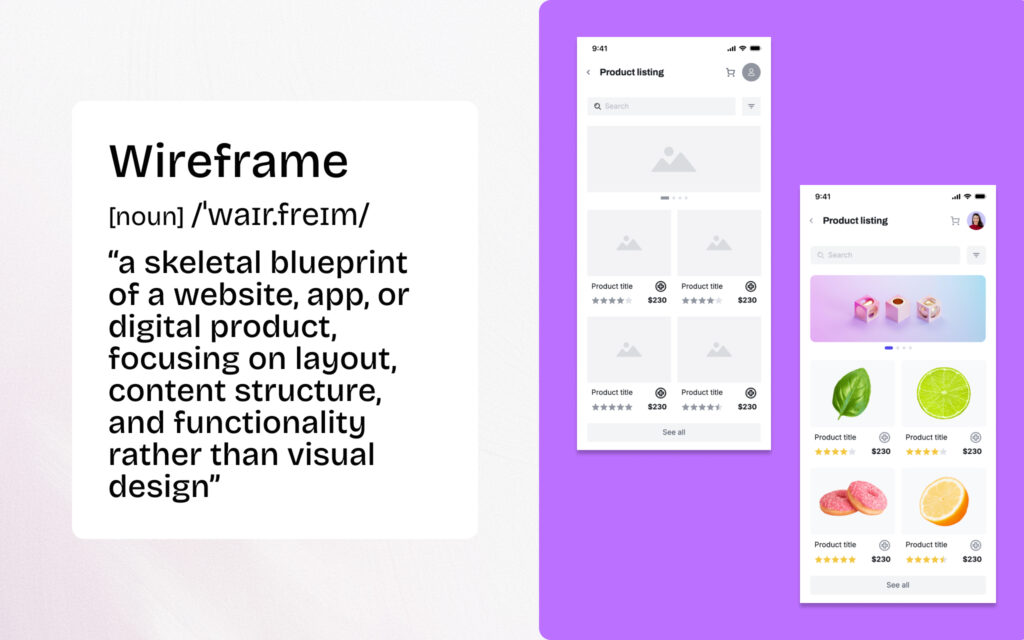
A wireframe is a static layout showing structure and content placement without detailed styling. A prototype adds interactivity—clickable buttons, screen transitions, and user flows. Many AI tools generate wireframes that can be converted into interactive prototypes within the same platform.
Visily's AI accepts text descriptions, sketches, or screenshots as input. The system analyzes your input using machine learning models trained on thousands of UI patterns, then generates appropriate layouts with proper component placement. You can then customize any element, add interactions, and export to other tools or share with your team.