In Visily, a screen works like a frame or artboard you may be familiar with from other design tools. It represents a single application screen, whether for mobile, web, or other platforms.
Visily provides several ways to add a screen: using AI, selecting from prebuilt templates, or simply creating an empty one. You can find the “Add New” menu in the left-side panel of the board to add a screen.
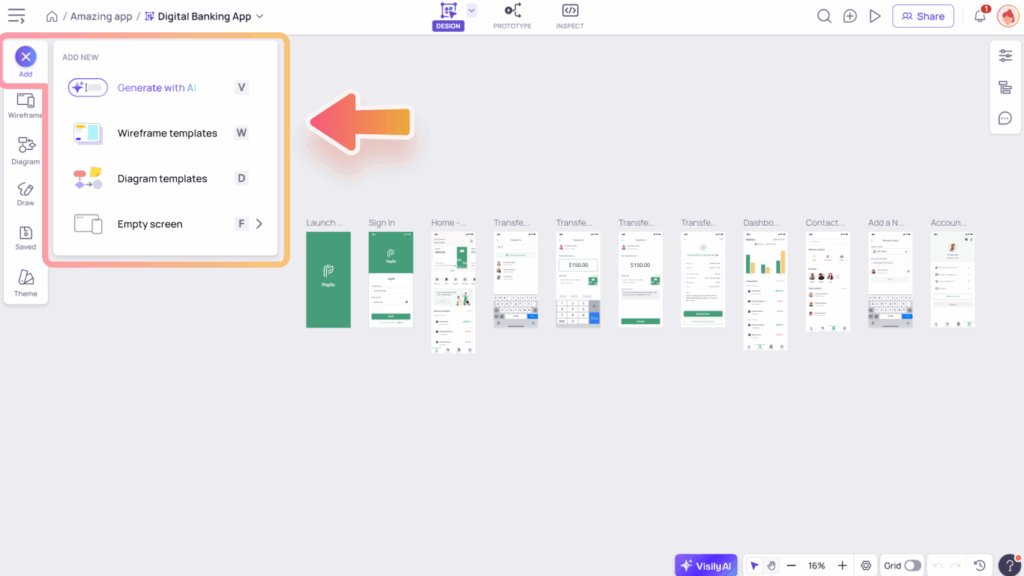
Add screens with “Generate with AI” option
Once you’ve created a board, you can add screens with Visily AI anytime. Click the Visily AI button in the bottom bar or press “V” to open the AI chat, then describe the screens you want, whether for mobile, website, or web app, and the AI will generate them for you.
Learn more about how to use the Visily AI Chat Assistant here.
Add screens with “Wireframe templates” option
Visily offers a wide variety of templates for you to explore, and you can use them to create new screens anytime. To open the template dialog and browse screen templates, try one of the following:
- From the “Add New” menu, select “Wireframe templates”
- Press the hotkey
W - Open the “Wireframe Library” panel and go to the “Templates” tab, then select an option from the “Screen Templates” section.
Learn more about our Template Library here.
Add empty screen
You can also add an empty screen by selecting the “Empty screen” option or pressing “F” on your keyboard.
When adding a blank screen, you can choose from various screen sizes. These options include common device sizes such as laptop, mobile, and tablet, helping you design your prototype for the appropriate device format.